AWS Agent Registry in GovCloud: Test Discovery and Tool Access Separately
AWS announced general availability of Agent Registry in GovCloud US-West on November 6, 2026. This matters for teams that want a private catalog for agents, skills, MCP servers, tools, and custom resources inside a government cloud boundary. This announcement concerns GovCloud US-West, which is distinct from the commercial US West (Oregon) Region. It also means the launch should be read narrowly: do not infer that all AgentCore capabilities are available there just because Agent Registry is available.
What Agent Registry is, and what it is not
Think of Agent Registry as a private catalog. It helps organizations organize and govern discoverable entries for agent-related assets such as agents, skills, MCP servers, tools, and custom resources. The registry can help control who can find an entry and how it is presented to intended consumers.
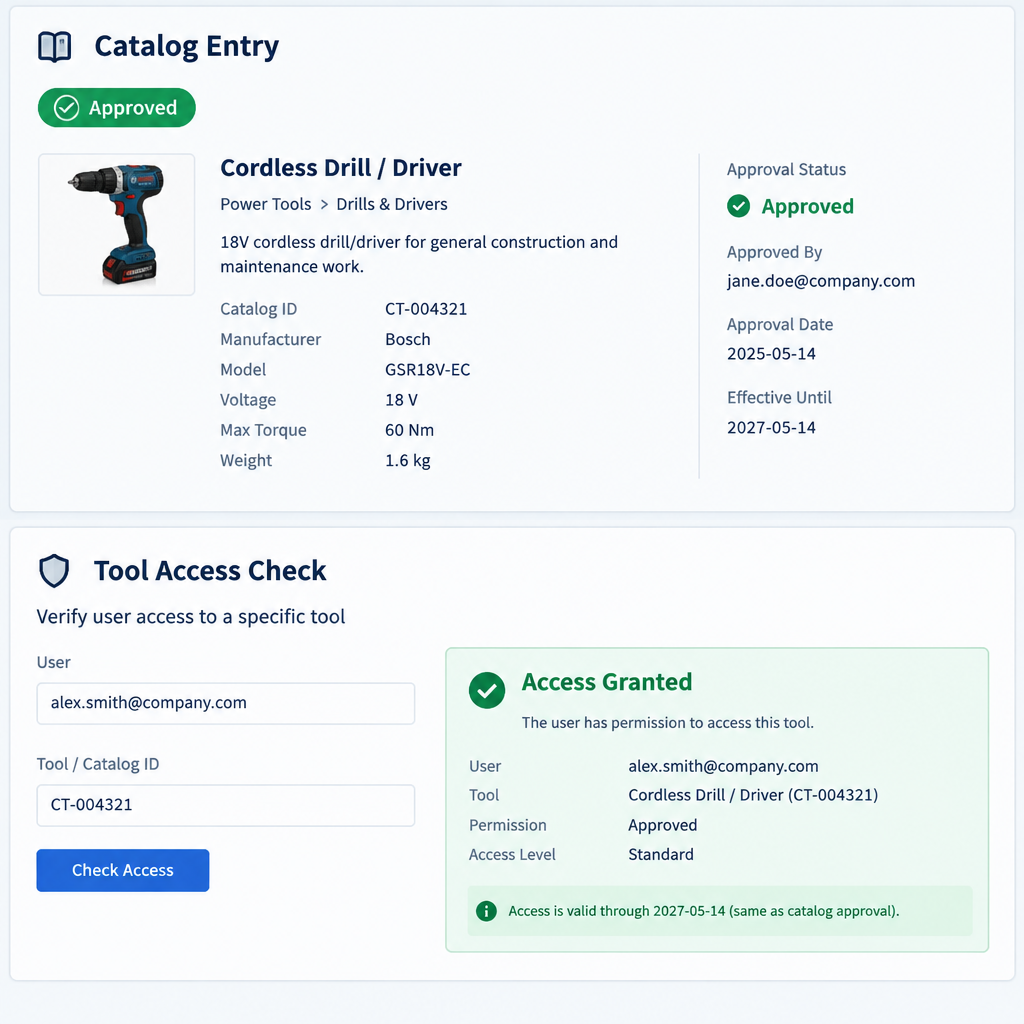
What it is not: registry approval or visibility is not the same thing as granting access to an underlying tool, deploying that tool, certifying it for compliance, or proving that it will execute successfully. Those are separate concerns and should be tested separately.
A practical pilot pattern: separate discovery from access
A useful pilot uses one harmless, read-only tool in a test environment and a synthetic dataset. The goal is to verify governance boundaries without implying production readiness. In this pilot, use an approved test identity and keep discovery testing distinct from tool invocation testing.
- First, confirm the registry record itself is approved according to your internal process.
- Then test discoverability as the intended consumer test role, not as an administrator or registry owner.
- After that, test tool access under the intended consumer test role when the same role is expected to do both checks; otherwise, use the target tool’s own authorization controls.
- Keep the test tool read-only and the data synthetic so the exercise stays low risk.
Why the separation matters
If discovery and access are treated as the same thing, teams can misread a successful catalog lookup as proof of operational permission. That can hide gaps in authorization design, create false confidence in the tool path, and complicate audits. Separating the checks helps you see whether the registry is working as a catalog and whether the tool is independently protected by its own access controls.
Manual approval is a workflow, not a universal default
Approval for registry entries should be treated as a configurable governance workflow. It may be manual in some organizations and more automated in others, depending on policy. Do not assume that manual approval is always enabled by default or that every registry uses the same review path.
Actionable checklist for a safe validation run
- Confirm the scope: the registry feature you are evaluating is the GovCloud US-West launch, not a broader regional rollout.
- Verify the registry entry has been approved through your configured governance process.
- Check that the entry is visible to the intended consumer identity and not only to an administrator.
- Validate that the consumer can discover the catalog entry without assuming it can invoke the tool.
- Test the tool separately under its own authorization model with a read-only action only.
- Use synthetic data and an approved test identity for every check.
- Record discovery success and tool-access success as two different outcomes.
- Treat discovery failures as starting points to examine record state, caller authorization, and indexing.
- Treat invocation failures as starting points to examine tool authorization and runtime.
- Use the intended consumer test role for both checks when the same role is expected to do both.
Common failure outcomes to distinguish
- If the registry entry is missing or unapproved, the issue is with governance or publication of the catalog record.
- If the intended consumer cannot find the entry, the issue is with discoverability, audience scoping, or visibility settings.
- If the entry is visible but the tool cannot be used, the issue is with the tool’s own authorization or runtime path.
- If the tool works for an admin but not for the test identity, the problem is likely a privilege mismatch rather than a registry problem.
What to document after the pilot
Capture the registry entry status, the intended consumer identity used for discovery, the separate identity used for tool access if applicable, and the exact pass or fail outcome for each step. Keep the notes focused on evidence, not assumptions. That makes it easier to decide whether the catalog workflow, visibility model, or tool authorization needs adjustment.
AWS announcement: Agent Registry in GovCloud US-West
AWS documentation: Agent Registry overview
AWS documentation: Create and manage registry entries